
How to Use LinkedIn to Reach General Contractors, and What Is Safe to Automate

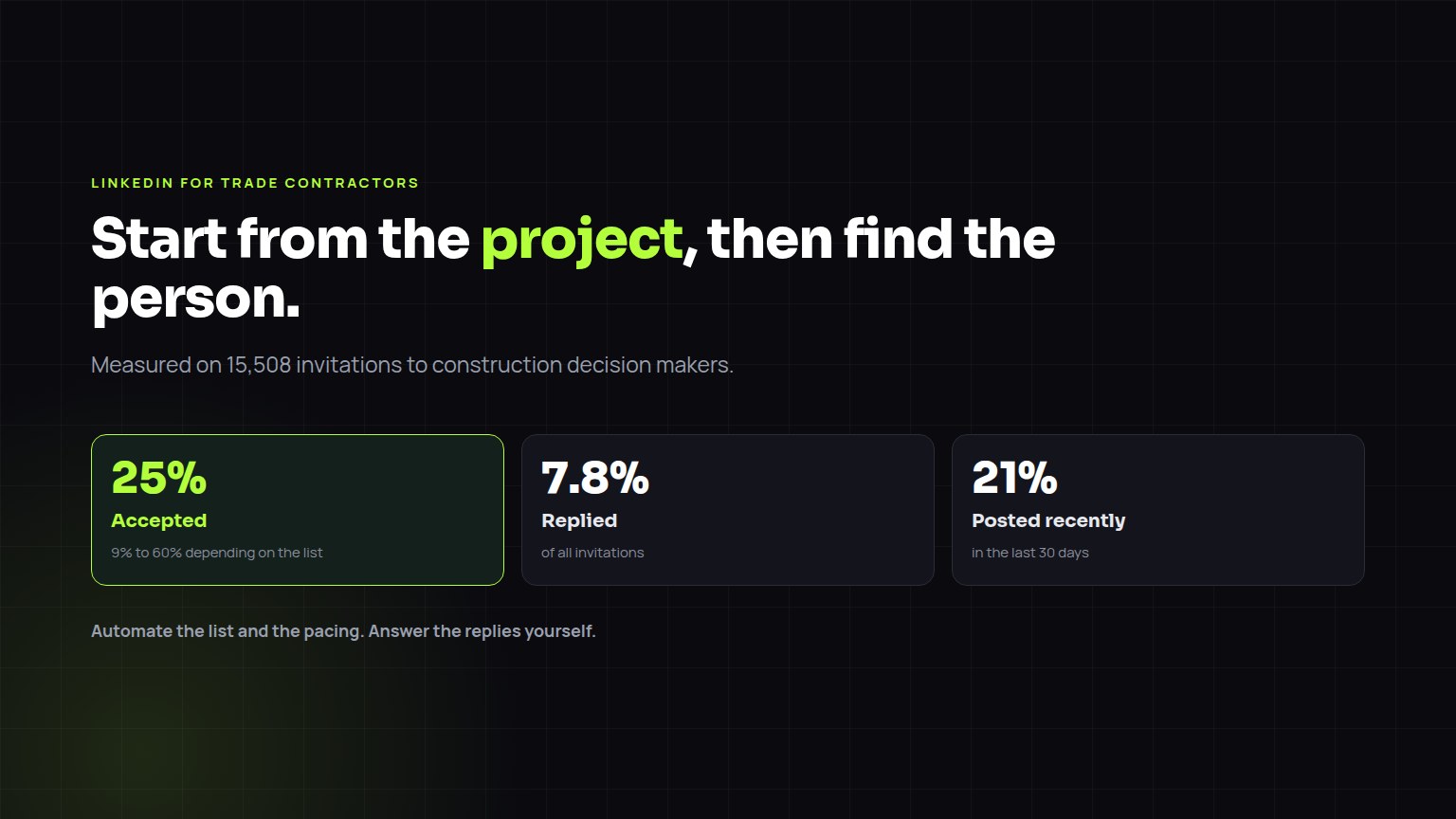
LinkedIn works for trade contractors when you start from a project, not from a search. Find general contractors with active jobs at the stage when your trade is picked, connect with the person who awards your trade (the owner at a small GC, the project manager, preconstruction manager or estimator at a larger one), send the invitation without a pitch, and after they accept, send one short message about their specific project. Automate the list building, the pacing and the reminders; do the first real conversation yourself. Across Builtie-run campaigns, 25% of invitations to project decision makers were accepted and 7.8% got a reply. LinkedIn's User Agreement restricts automated activity, so any tool that acts on your account carries a risk of restriction, and volume should stay at what a person could do by hand.
The same four steps, whether the buyer is a builder, a designer, an owner or a company you want to acquire.
Who at a general contractor actually awards your trade
Connecting with the wrong title is the most common waste on LinkedIn. Superintendents are worth knowing, but at most firms they do not sign the subcontract. Aim at the person who prices and buys out the job.
| General contractor size | Who usually picks the trade | Who influences it |
|---|---|---|
| Small GC or custom builder (under 20 staff) | The owner or president | The site superintendent who will run your crew |
| Mid-size commercial GC | Project manager, preconstruction manager or chief estimator | Superintendent, project engineer |
| Large commercial GC | Preconstruction and estimating, then buyout or procurement for the contract | Subcontractor prequalification, the project team |
| Developer building its own projects | Development manager or construction manager | The architect, on specified trades |
A LinkedIn sequence that works for trade contractors
Every step after the first depends on having picked a live project.
For the timing and wording of each touch across LinkedIn, email and phone, see A proactive outreach sequence for trade contractors.
What the numbers look like
Measured across Builtie-run campaigns to September 23, 2026. Acceptance ranged from 9% to 60% between lists.
The list decided the result more than the wording did: acceptance ran from 9% to 60% between campaigns with at least 200 invitations each. Of the decision makers we checked for activity, 21% had posted in the last 30 days, so a plan built on commenting on their posts reaches few of them. As an outside check, a 2026 study of 14,077 LinkedIn outreach records by the agency Belkins found 1.3% of connected prospects booked a meeting.
What to automate and what to keep
| Task | Automate it? | Why |
|---|---|---|
| Building the list from active projects | Yes | Research is the slowest part, and it is the same work every week |
| Finding the right person at each GC and checking their current employer | Yes, then spot-check | Name-only matches are wrong often enough to matter |
| Pacing invitations within daily and weekly limits | Yes | A person forgets; a limit that is enforced does not |
| Reminders to follow up, and logging replies against the project | Yes | A follow-up that slips is the most common lost job |
| Answering a real reply | No | The first real conversation is where the relationship starts |
| Comments and likes meant to look spontaneous | No | They read as automated, and most decision makers rarely post |
| The same message to every contact | No | A message that names their project is the one they answer |
Is LinkedIn automation allowed?
LinkedIn's User Agreement prohibits using bots or other unauthorized automated methods to access the service, add contacts or send messages, and LinkedIn limits how many invitations an account can send each week without publishing the exact number. Any tool that acts on your account, whether a browser extension or a cloud service, can lead to a warning or a restriction. The practical rules: keep daily and weekly volume at what one person could send by hand, never send the same text to everyone, and stop when invitations start going unanswered.
Builtie sends from your own account on the Growth plan, paced within daily and weekly caps set per seat and counted each day, and each message references the project it is about. The account risk is lower at human volume; it is not zero, and no tool that sends for you can honestly say otherwise.
LinkedIn tools, by what they are for
| Kind of tool | Examples | Where the list comes from | Fit for trade contractors |
|---|---|---|---|
| General LinkedIn automation | Expandi, Dripify, PhantomBuster, SalesRobot | You supply it, usually from a search | Works on any list; knows nothing about projects or trades |
| LinkedIn Sales Navigator | LinkedIn's own sales product | Advanced people and company search, saved lists | Good for research; sending is manual |
| Project data with outreach | Builtie (Growth plan) | Permitted projects in your trade's award window, with a verified decision maker | Built for selling to builders, GCs and developers |
Categories as of September 2026; check each vendor before you buy. Email is the other half of the sequence: Keeping sales emails out of spam.
Plans and coverage
Builtie's Starter plan is $79 per seat per month (CAD) for 20 projects; Growth is $99 for 50 projects and adds the LinkedIn and email outreach you run yourself. Opening a project spends one credit, and the decision makers, emails, phones and AI call script inside it are included. Your monthly credits reset at each renewal, and extra credit packs are valid for 30 days. The free trial runs 7 days with 10 projects. Custom, where Builtie's team runs the outreach for you, starts from CAD $1,500 a month on top of a Growth seat.
Builtie covers North America, with its deepest permit and contact data in the Greater Toronto Area, where it started. How much a city yields depends on what that municipality publishes, so ask for live sample projects in your own city before you buy.
Frequently asked questions
How can I automate my LinkedIn networking to connect with general contractors?
Automate the research and the pacing, not the conversation. Build the list from GCs with active projects in your trade's window, find the person who awards your trade, send invitations within daily and weekly limits, and set reminders for follow-ups. Answer replies yourself. Builtie's Growth plan does the list, the person and the paced sending from your own account.
What is the role of LinkedIn automation in construction business development?
It removes the repetitive part: finding which GCs and developers are building, who runs their projects, and sending invitations at a steady pace. It does not replace the relationship. Across Builtie-run campaigns, 25% of invitations to project decision makers were accepted and 7.8% got a reply.
What are the best practices for connecting with general contractor project leads on LinkedIn?
Start from a live project, connect with the project manager, preconstruction manager or estimator rather than a random title, invite without a pitch, and after acceptance send one short message that names their project and asks a single question.
Is LinkedIn automation against LinkedIn's rules?
LinkedIn's User Agreement prohibits bots and unauthorized automated activity, so any tool that acts on your account carries a risk of restriction. Keeping volume at human levels and messages specific lowers that risk; it does not remove it.
How many LinkedIn connection requests can I send a week?
LinkedIn does not publish an exact number and it varies by account. Around 100 a week is a common working ceiling. Hitting the limit pauses your invitations, so pace them across the week.
Do I need Sales Navigator to sell to general contractors?
It helps with search and saved lists, but it does not know which GCs have a project in your trade's window. That part comes from project data such as building permits.